
How to fill CTC credentials on Zurfex
Use your official CARB Credentialed Tester Certificate (Heavy-Duty Inspection and Maintenance / Clean Truck Check). Match each red box on the sample below to the Zurfex signup fields.
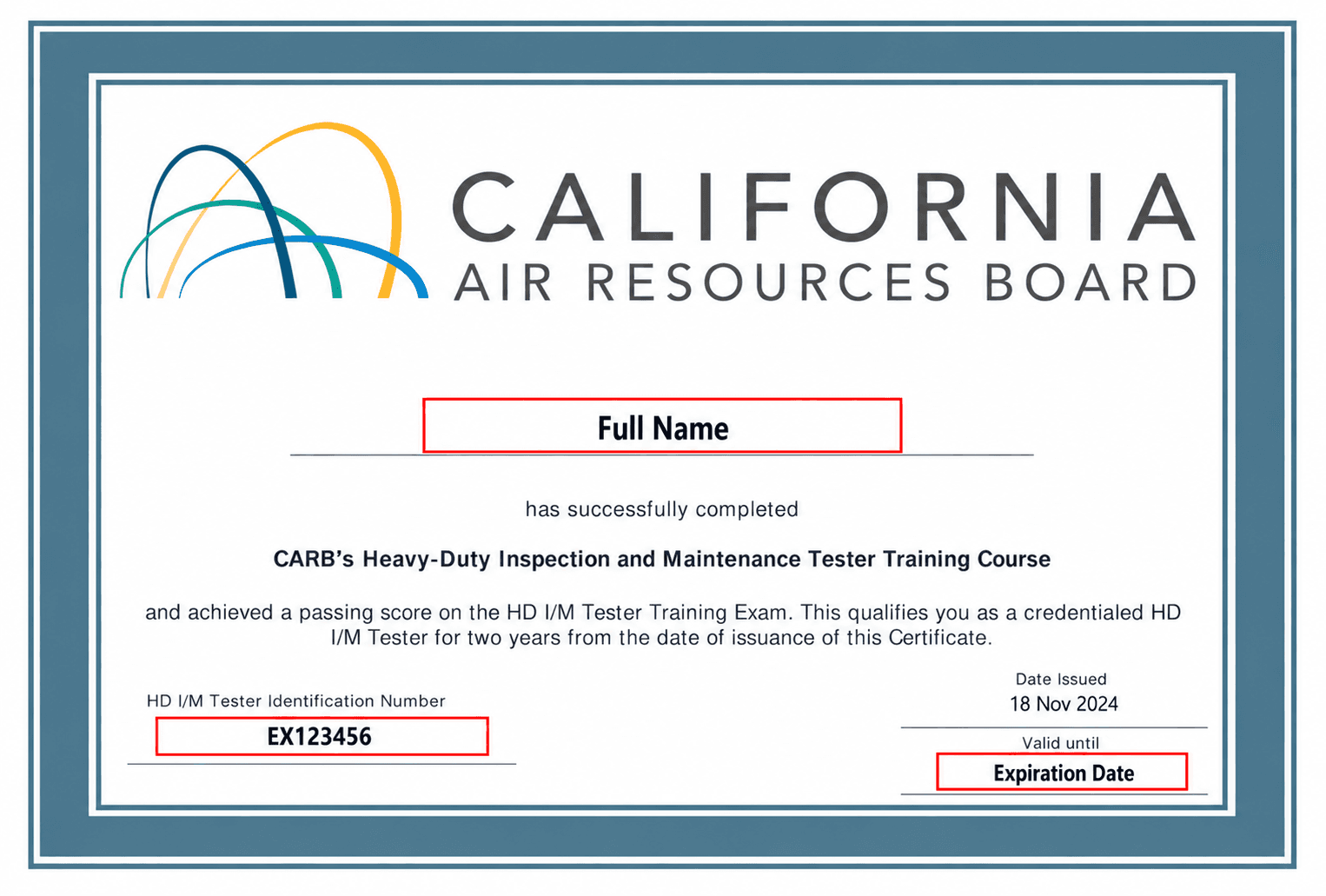
Field-by-field mapping
On the certificate
Full Name (center, under the title)
On Zurfex: use the same legal name on your account / business name so it matches what admins see on the certificate.
On the certificate
HD I/M Tester Identification Number (bottom left)
Zurfex field: CTC Tester ID — copy the full ID exactly (example format: EX123456). Do not invent or shorten it.
On the certificate
Valid until → Expiration Date (bottom right)
Zurfex field: CTC Tester ID Expiration Date — enter the date under Valid until, not Date Issued. It must be a future date.
Upload
Full certificate PDF or image
Zurfex field: CTC Tester Certificate — upload the complete certificate file from CTC-VIS (PDF, JPG, or PNG). Admins use it to verify ID and expiration.
Where to get your certificate
Complete CARB’s free Clean Truck Check / HD I/M tester training and exam. After you pass, download your Credentialed Tester Certificate from your CTC-VIS tester account (My Details / Documents). Official CARB guidance: Tester Training and Examination Factsheet.
Also see our requirements overview and become a tester guides.